|

Information-technology racks for servers, IT appliances and tele-communications gear
Racks are integral to the success of your organization, providing the platform that houses the mission-critical IT equipment your business depends on.
Selecting the right rack and accessories will keep your business running smoothly, make the management and organization of your datacenter more efficient, and help effectively power, cool, and protect your IT equipment.
Select a rack most suitable to your application and IT environment:
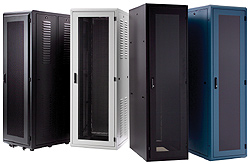 4-post racks, also known as 'server racks' or 'equipment racks' – Enclosed and scured cabinets or open frames that typically house your 'heavy-duty' IT equipment such as servers, Blades, storage etc. 4-post racks, also known as 'server racks' or 'equipment racks' – Enclosed and scured cabinets or open frames that typically house your 'heavy-duty' IT equipment such as servers, Blades, storage etc.
If your 4-post rack installation is cable-intensive, you may want to consider choosing a wider rack (such as Plyant CLC series) while incorporating extensive built-in cable-management solutions.
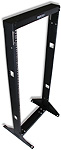 2-post racks – Also known as 'Relay Racks' are bolted to the floor or free-standing, typically designed for mounting network and telecommunication gear such as patch-panels, Ethernet switches, hubs, routers, etc. 2-post racks – Also known as 'Relay Racks' are bolted to the floor or free-standing, typically designed for mounting network and telecommunication gear such as patch-panels, Ethernet switches, hubs, routers, etc.
2-post rack installations often are cable-intensive, requiring inter-bay cable-troughs as well as rack-mount cable management solutions.
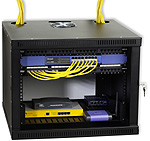
Wall-mount racks – Enclosed cabinets or open frame racks designed to be mounted to the wall, for space-saving server mounting, network/telco-distribution application and 'communication closet' implementation.
Effectively Manage Wires and Cables
.jpg "Cable organizers") Being that cable-management within a rack-installation tends to get 'messy' over a period of time – in which cables typically need to be added and removed, cable-management within a rack-installation is a daunting task. Being that cable-management within a rack-installation tends to get 'messy' over a period of time – in which cables typically need to be added and removed, cable-management within a rack-installation is a daunting task.
Many racks come with their own fully-integrated cable-management hardware. Consult with a Rackit sales engineer to utilize such uniquely-designed hardware, as well as incorporating Rack-Mount Cable Organizers and Strain-Relief Bars.
Save Space in the Rack
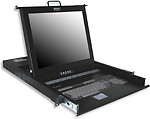 Space is at a premium in any data-canter, and inside each rack. Substitute ordinary (yet space-guzzler) peripherals such as monitor/keyboards/mice with space-saving (and sleek looking) 1U KVM Drawers and KVM Console/Switches, while optimizing space utilization shelves that adjust to your rack, for mounting odds and ends. Space is at a premium in any data-canter, and inside each rack. Substitute ordinary (yet space-guzzler) peripherals such as monitor/keyboards/mice with space-saving (and sleek looking) 1U KVM Drawers and KVM Console/Switches, while optimizing space utilization shelves that adjust to your rack, for mounting odds and ends.
.jpg "Shelves")
KVM Switch, Server Rack, LAN management cables, KVM Switches, rackmount, computer rack
|